
If you’ve ever typed a troubleshooting query into Google and clicked the first result you saw, you’ve experienced something important: most users start with search, not with a product manual.
Whether someone searches “device won’t turn on”, “restore factory settings Model X” or “error code 10 meaning”, the journey almost always begins the same way; through a search engine or an AI-powered answer box. And in 2025, these tools are increasingly deciding which documentation surfaces first.
For companies producing complex products or software, this creates a challenge and an opportunity. Your documentation may be accurate, detailed, and well-structured, but if search engines (and now generative AI tools) can’t interpret it, users may never actually see it. Instead, they land on forums, third-party blogs, or content that’s outdated or incorrect.
Search-friendly technical writing bridges that gap.
It helps your documentation reach the people who need it, on the platforms where they’re already looking.
Why search-friendly documentation matters
Most users won’t click through a website menu or portal to find help. They want quick, task-based answers, especially on mobile.
Improving the search visibility of technical content leads to benefits across the business:
Lower customer support volume
Users find accurate answers sooner, reducing support tickets and repetitive queries.
Better user experience
Clear, discoverable documentation increases customer satisfaction and reduces friction.
Stronger product trust
People trust products with reliable, easy-to-find guidance.
Improved website performance
Search-friendly documentation supports E-E-A-T signals and strengthens your overall domain authority.
More value from your technical team
Technical writers already produce high-quality content — SEO simply makes it more discoverable.
What technical writers already do well
The good news: the foundations of SEO align closely with the principles of good technical communication.
Technical writers naturally:
- create structured, logical content
- use consistent terminology
- break down tasks clearly
- write in short, scannable paragraphs
- focus on user intent and practical tasks
This means you’re already halfway to creating search-friendly documentation.
The next step is making sure that content is also easy for machines to interpret.
How to write technical content that search engines understand
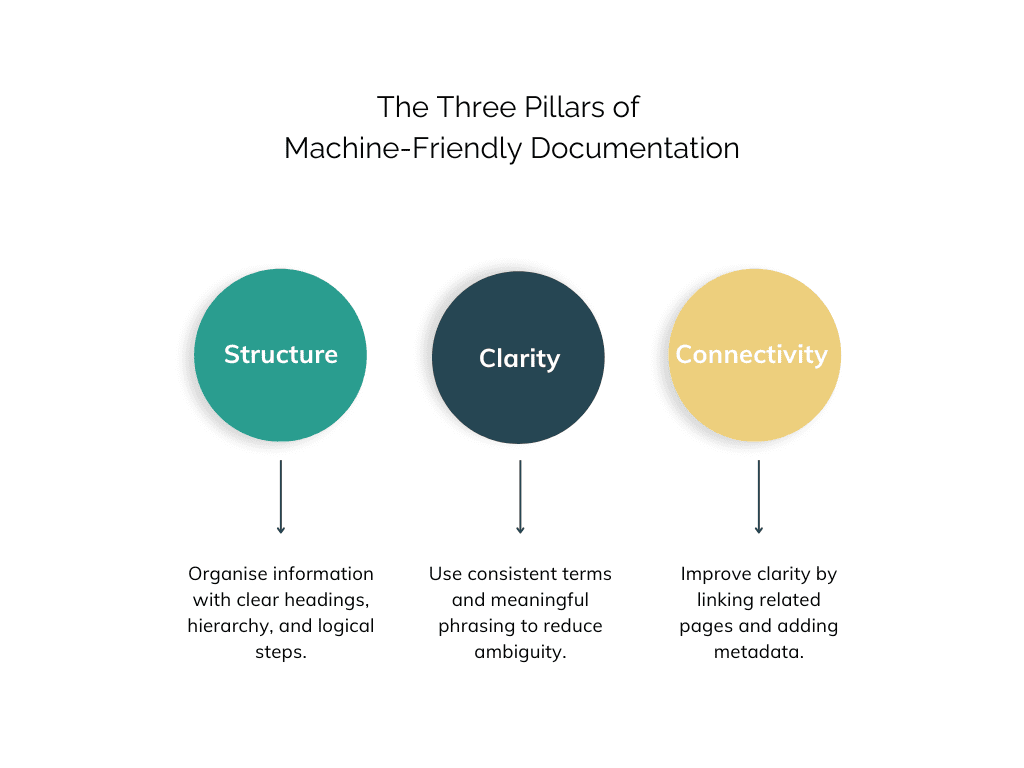
Search engines and AI tools don’t read the way humans do. They use patterns, structure, metadata, and relationships between pages to understand meaning.
Here are the most important techniques to make documentation machine-friendly without changing your tone or writing style.
1. Start with real search behaviour
Keyword research shouldn’t turn your documentation into marketing copy. Instead, it helps you understand how real users phrase their problems.
Often, internal product terminology differs from what customers search for.
Example:
Internal label → “System calibration”
User searches → “How to fix inaccurate readings”
Use this insight to shape headings and task descriptions so they match user intent.
2. Use descriptive headings that mirror user language
Search engines rely heavily on headings to interpret content.
Avoid vague labels like “Overview” or “Information”. Instead, use clear, meaningful headings:
- “How to replace the water filter”
- “Troubleshooting: Device won’t power on”
- “What error code 10 means”
Clear headings also increase your chances of appearing in featured snippets or AI answer boxes.
3. Keep a clean heading hierarchy
Heading levels (H1 → H2 → H3) help machines map the structure of your content.
Avoid skipping levels or using headings purely for formatting.
A good rule of thumb: if the section supports the idea above it, it should be a child heading, not a sibling.
4. Write instructions in numbered steps
Lists (especially numbered lists) are easier for both:
- users to follow
- search engines and AI models to interpret
Paragraphs describing processes are harder to scan and harder for machines to summarise accurately.
5. Use internal links to show relationships
Internal links help search engines understand how topics connect.
They’re also valuable for guiding users through tasks.
Example:
“See Resetting the device for step-by-step instructions.”
Keep links contextual, not generic or overly promotional.
6. Optimise metadata (lightly)
Titles and meta descriptions don’t need heavy optimisation. Instead:
- keep titles under ~60 characters
- keep descriptions under ~160
- accurately describe the task or issue a user is trying to solve
Avoid keyword stuffing. Clarity always wins.
7. Make documentation mobile-friendly
Mobile dominance matters — according to Statista.com, over 62% of global search traffic comes from mobile devices.
For documentation, this means:
- short paragraphs
- meaningful headings
- compressed images
- responsive design
- structured data where relevant
Readable, mobile-friendly pages help both users and search engines understand your content quickly.
Preparing for AI Overviews & search-generated answers
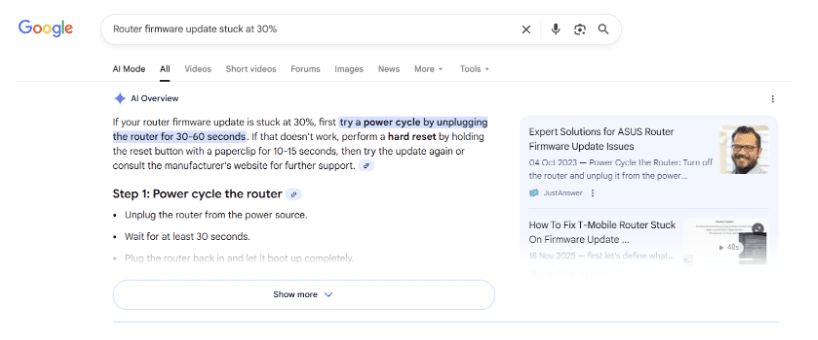
AI-driven search tools (like Google’s AI Overviews and other generative answer features) extract their responses from:
- clear headings
- well-defined sections
- structured steps
- labelled procedures
- FAQ-style content
- natural language that mirrors common queries
If documentation is unstructured or too dense, AI tools may:
- misinterpret the content
- skip over important information
- surface third-party content instead
This is why clear structure is more important than ever.
A practical checklist you can use today
Headings
- Do they accurately describe the content?
- Does each one map to a user task or question?
Structure
- One H1?
- Logical flow?
- Steps listed rather than embedded in paragraphs?
Language
- Consistent terminology?
- Clear, concise sentences?
Connections
- Related topics linked?
- FAQs or troubleshooting entries highlighted?
Mobile
- Is the layout responsive?
- Are images compressed?
- Is structured data used where appropriate?
Final thoughts
Search-friendly documentation isn’t about “doing SEO” in the marketing sense. It’s about helping your content reach users at the exact moment they need it — whether they’re searching on Google, scanning an AI-generated answer, or navigating your help centre.
A few small adjustments make that content easier for both humans and machines to understand, and far more discoverable.